Key Takeaways
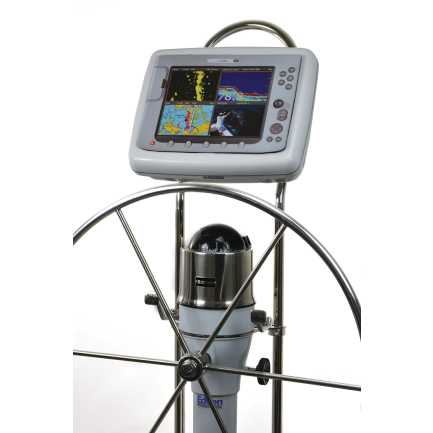
- NavPod protects marine electronics by enclosing displays and instruments in durable, weather-resistant housings.
- Pre-cut pods are made for specific Garmin, Raymarine, Simrad, B&G, and other display models.
- Uncut pods are best when you need a custom cutout or want flexibility for future electronics upgrades.
- SailPod, PowerPod, InstrumentPod, SystemPod, and RailMount designs solve different helm, pedestal, rail, and multi-display mounting needs.
- Check display size, guard diameter, usable face dimensions, and cable routing before ordering.
Frequently Asked Questions
What is a NavPod used for?
A NavPod is used to mount and protect marine electronics such as chartplotters, GPS units, multifunction displays, and instrument displays. It helps create a clean helm layout while shielding electronics from spray, salt, UV exposure, and vibration.
Are NavPod enclosures waterproof?
NavPod housings are designed as weather-resistant marine electronics enclosures with sealed construction to help protect displays from water, salt, and sun exposure. They are built for exposed helm environments, but installation quality and cable sealing are important for best protection.
What is the difference between a SailPod and a PowerPod?
A SailPod is typically used on sailboat pedestal guards for chartplotters or multifunction displays. A PowerPod is often used on powerboat helms, consoles, or compact mounting areas where a secure display housing is needed.
Should I choose a pre-cut or uncut NavPod?
Choose a pre-cut NavPod when it matches your exact electronics model for a faster, cleaner installation. Choose an uncut NavPod if you need a custom layout, have less common electronics, or want flexibility for multiple instruments.
Can NavPod fit Garmin, Raymarine, Simrad, or B&G displays?
Yes. NavPod offers many pre-cut and uncut housings for popular marine electronics brands, including Garmin, Raymarine, Simrad, and B&G. Always confirm the exact display model, cutout size, and mounting style before ordering.
What should I check before installing a NavPod?
Check the display model, usable face dimensions, mounting location, pedestal guard or rail size, cable routing, viewing angle, and access for future service. Dry-fit the electronics before final drilling or cutting.